 |
FirstModulAR 0.1.0
|
|
FirstModulAR 0.1.0
|
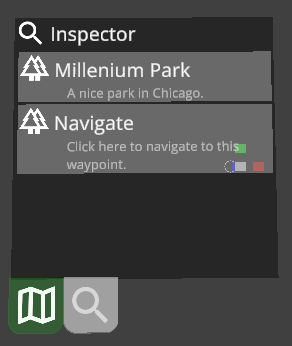
The inspector widget provides a generic "inspector" that can be used to "inspect" things. Note that this inspector is different from the inspector window which is used in the Unity Editor during development. Rather, this is an inspector used in the application during runtime, used by first responders to view information about an object.
For example, if a user clicks on a Point of Interest on the map, it could be used to show that Point of Interest's metadata, or if a user clicks on a squadmate's name in a list, it might show additional data about that squadmate.
In concept, this was imagined as a "universal" inspector, in the spirit of modularity. We wanted to leave the option open for developers to make customized inspector UIs for specific data types (e.g. a designated Point of Interest inspector to inspect Points of Interest), but in the event that scenario developers didn't want to add a ton of extra custom packages, this "universal" inspector can inspect any object or data type that implements the IInspectable interface.
Objects that inherit from the IInspectable interface must provide a list of Inspector Rows, small discrete rows that contain chunks of information. Each row also provides an icon associated with it, and an optional link to be triggered if the row is clicked.
Reference the How to setup a widget section in the readme of the Widgets package.
 1.12.0