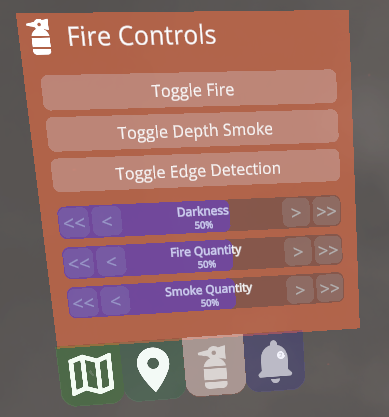
The Fire Controls widget provides a way to adjust the simulated smoke and fire of the Fire Demo in a number of ways.
As shown in the image above, it allows the user to adjust the following options:
- Toggle Fire: Toggles on/off the Magio simulated fire effect.
- Toggle Depth Smoke: Toggles on/off the plane-based smoke effect. This effect uses Meta's depth api across multiple planes to give the user the illusion of being able to "reach into" the smoke, and have real world objects interact with the smoke by being occluded more the further away they are.
- Toggle Edge Detection: Toggles on/off Meta's edge detection system. The edge detection can be used to "see through the smoke" by highlighting real world objects that would otherwise be invisible due to the simulated smoke.
- Darkness Slider: Controls the amount of simulated darkness is added to the passthrough layer. 0% will not have any simulated darkness, and 100% will make it impossible to see any real-world objects (without edge detection).
- Fire Quantity: Manipulates the proportion of fire particles simulated by the Magio fire effect.
- Smoke Quantity: Manipulates the proportion of smoke particles simulated by the Magio fire effect.
Setup
Reference the How to setup a widget section in the readme of the Widgets package.

 1.12.0